PERSONAL BANKING UPGRADE INFORMATION & GUIDE:

For FCSB Personal Online & Mobile 

Coming April 22, 2026!


FCSB is upgrading your Digital & Mobile Banking experience! Our redesigned Personal Online Banking dashboard and new Mobile App give you a clearer view of your accounts, faster navigation, and simple one‑login access—supported by enhanced two‑factor security that makes everyday banking easier, safer, and more seamless. It’s designed to help you manage your finances more efficiently wherever you are.

This page includes everything you need to know for the upgrade taking place April 20th through April 22nd. And as always, we’re here to help you every step of the way.

How to Get Ready:


Ensure your cell phone number and email address are up to date in your current online banking profile. To receive your one-time passcode during sign-in, all online banking users must have a current mobile phone number or email address on file.

Need to update your contact details?


Contact Online Banking Support:

Email: support@myfcsb.com   
Call: 1866-400-8674

UPGRADE ESSENTIALS: WHAT TO KNOW
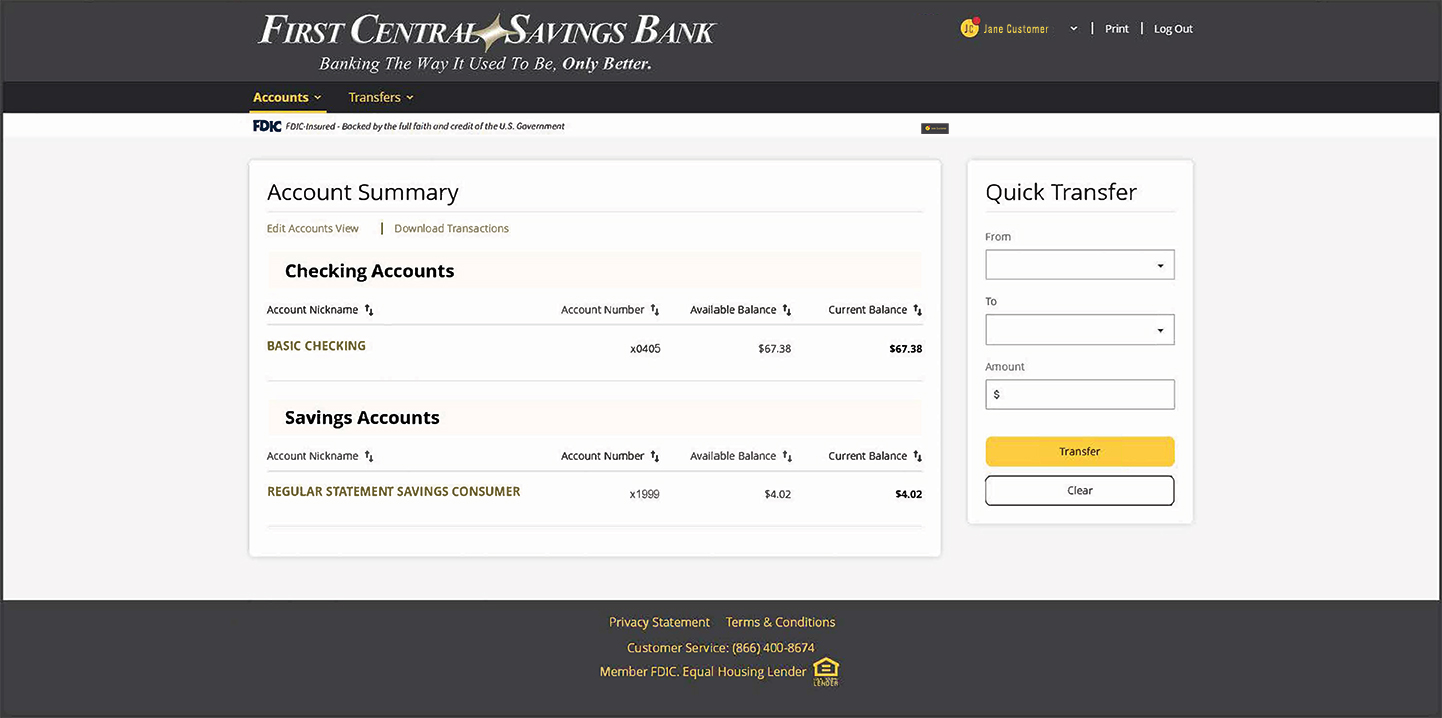
Screenshot of the new Personal Online Banking platform.

Will my username and password change?

No. You’ll continue to use your existing user ID and password. If you are unsure of your user ID, contact FCSB Online Bank Support. If you are unsure of your password, select “Forgot Password” on the login screen and follow the prompts or contact FCSB Online Bank Support at 866-400-8674.

Can I still use the old URL to log in to online banking?

No. The old URL will no longer work. Please be sure to use our new online banking login page to access your account. For the best experience, update any saved bookmarks or favorites to your browser with the new login link.

Will I have to download a new app?

Yes – this transition includes a more refined, unified mobile app experience only made possible with an entirely new app. Once released, you’ll be prompted to download the new app when signing into the current FCSB Mobile app.

What happens to my Bill Pay?

Your bill payees and scheduled bill payments will transfer to the new platform. However, we recommend reviewing all scheduled payments after your first login.

All users will be redirected / prompted to download the new app anytime they try to open the existing app.

 

SCHEDULE:


-APRIL 20, 2026: UPGRADE BEGINS AT 7:00 P.M. EST.

Personal Banking will be available in read-only mode. Personal online banking services will be unavailable beginning April 20 at 7:00 P.M, as the upgrade process begins.


-APRIL 21, 2026: UPGRADE IN PROGRESS

The system upgrade will continue throughout the day.

Personal Banking will be available in read-only mode. Personal online banking services will be unavailable as the upgrade process continues.


-APRIL 22, 2026: ACCESS RESTORED

Access to online banking is expected to resume by 10:00 A.M. on Wednesday, April 22nd.

Once access is restored, you can log in to the updated experience!
FREQUENTLY ASKED QUESTIONS

Yes – this transition includes a more refined, unified mobile app experience only made possible with an entirely new app. Once released, you’ll be prompted to download the new app when signing into the current FCSB Mobile app.

No. The old URL will no longer work. Please be sure to use our new online banking login page to access your account. For the best experience, update any saved bookmarks or favorites to your browser with the new login link.

No. You’ll continue to use your existing user ID and password.
  • If you are unsure of your user ID, contact FCSB Online Bank Support.
  • If you are unsure of your password, select “Forgot Password” on the login screen and follow the prompts or contact FCSB Online Bank Support.
  • Business users: If you are unsure of your user ID or password, please call us at 1866-400-8674.


If you already use the FCSB Mobile app, it may automatically update depending on your phone settings. If it doesn’t update automatically, visit your app store and manually update the app.

If you already use the FCSB Business Mobile app, Business Banking app is being discontinued. All Business users must download the new FCSB Mobile app and delete the old Business app.

All customers—Business and Personal—will now use one app and one login.


If you see a message that the app isn’t supported, this may mean your phone’s software needs to be updated in your settings. After you update your device, try downloading or updating the app again.

You’ll need to log in manually the first time after the upgrade. After that, you can re-enable Face ID or Fingerprint Recognition login in your app settings.

Two-factor authentication is a security measure that adds an extra layer of protection to your online banking account.
You will receive a one-time passcode via text or phone call to verify your identity during your first login or when logging in from an unknown device.


The account will use the primary phone number associated with the account holder for the two-factor authentication process.
For shared accounts (e.g., spouses or small business owners), this may affect the login process.  We recommend each authorized user have their own login for a more secure experience.
To create a new personal account login, visit the digital banking website and enroll as a new user.
In order to create a business account login, contact your local branch for more information.


Your bill payees and scheduled bill payments will transfer to the new platform. However, we recommend reviewing all scheduled payments after your first login.

While most of your banking tools will transfer over, banking alerts will need to be reestablished. This is a great opportunity to personalize your online banking experience on the upgraded platform.

We understand that upgrading to a new online banking platform may raise questions – That’s why we’re here to support you every step of the way. Please contact First Central Savings Bank’s Online Banking Department:

📧 tel: 866-400-8674

📞 support@myfcsb.com

(Tel. Support Monday – Friday from 8:30 AM – 5:00 PM)

Online Banking Preview:


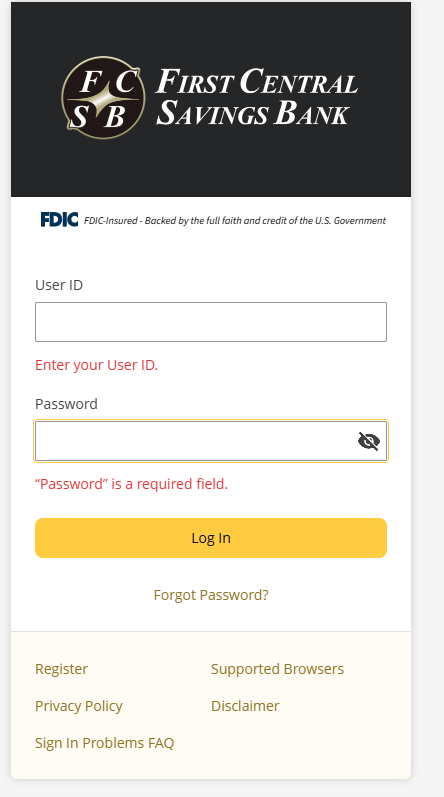
Online Banking Login Preview:


Need Help? We’ve Got You Covered

We understand that upgrading to a new digital banking platform may raise questions – That’s why we’re here to support you every step of the way. Please contact First Central Savings Bank’s Online Banking Department:

📧 support@myfcsb.com

📞 (866) 400-8674

(Tel. Support Monday – Friday from 8:30 AM – 5:00 PM)